Export and Import
In the CMS frontend, an Export button is offered both for an entire namespace and for an individual API, which after pressing offers a ZIP archive with all corresponding records for download. Since this currently also contains all media files, the archive can become quite extensive.
The export functionality is based on a simple HTTP GET call: /data/Namespace/_export/Comparison-pattern:
- Namespace: The namespace from which data is to be exported
- Comparison-pattern: A regular expression that defines the APIs to be exported. In the CMS frontend, the API's name is used for the export of an individual API (e.g.
/data/tutorial/_export/api1) and for all APIs of a namespace (e.g./data/tutorial/_export/.*). However, there are no limits to the imagination with direct access and all requirements should be able to be met — e.g./data/tutorial/_export/(api\d+|languages)for exporting all APIs in the namespace tutorial whose names begin with api and are continued only with digits, plus additionally the API languages.
Alternatively, an export based on project and application names is also offered for project management, also implemented via a simple HTTP GET:
/projects/_export/ProjectName: exports all APIs of a project, possibly also from different namespaces./projects/_export/ProjectName*!*ApplicationName: restricts this to a single application, which can of course again contain different APIs in potentially different namespaces.
For an import, an HTTP POST is sent directly to the CMS, where as data a ZIP archive (Content-Type application/zip) created via the export is transmitted: /import. In the CMS frontend, the Import button on the start page is offered for this purpose.
A selection of the APIs contained in the archive is not provided, however the import process can be controlled via URL parameters, e.g. /import?execute&insertOnly:
- execute: If this parameter is not set, the archive is only checked for usability. No data is changed.
- insertOnly: If data already exists in an API, only previously unknown records (_id) from the archive are adopted. Existing records are never changed.
- allowDataLoss: Existing records are removed before importing, the associated API after the process exactly matches the state from the archive.
- skipProtectedApis: If the archive contains APIs for which no records may be imported, these are simply ignored.
- skipProtectedNamespaces: If the archive contains APIs in namespaces for which no APIs may be created or modified, these namespaces are ignored.
The parameters should be chosen carefully and not unnecessarily activated — with the exception of execute of course. Carelessness, for example with allowDataLoss, can lead to the irreversible loss of existing data.
The import process basically works as follows:
- The schema of all affected APIs is brought to the state from the archive — existing data may thereby become invalid; data migration is not provided. If possible, the existing API is deleted for this purpose — if no data yet exists or allowDataLoss was specified.
- If data exists and neither allowDataLoss nor insertOnly are set, the import process is aborted.
- If no APIs may be created or modified in the namespace and skipProtectedNamespaces is not set, an error and abort is also triggered.
- All records and associated files from the archive are imported. If identical records already exist, they are not changed — this can only occur with importOnly, since otherwise the existing API together with all data was already deleted beforehand.
- If no records may be created, deleted, or modified in the API and skipProtectedApis is not set, the import process is terminated with an error message.
A JSON structure as a response describes the result of the import process. In the maintenance interface, this is logged for each API contained in the archive and the overall success is also reported:
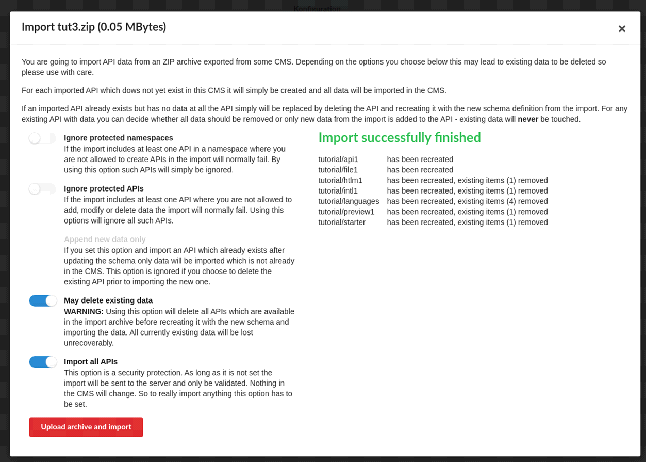
In this dialog, the individual parameters of the import process are also explained in somewhat more detail.