Value maps
A value map translates an input into a named set of typed outputs. For example, a state can resolve to a label, severity number, availability flag, colour, asset reference and optional template source. The caller decides how to use those values.
Maps are general layout data. Their matching and raw-value resolution are independent of list rendering. The List element is the only current element consumer. Other elements have no map configuration yet; no visibility, image, button or write-action binding is enabled by defining a map.
About the screenshots: These captures show the current editor using unsaved example configurations. Keys, data and source match the worked examples; the selected UI language controls labels.
Read this first
| Concept | Responsibility |
|---|---|
| Map name | Identifies one map within its layout. |
| Output definitions | Declare the keys and types available across all rules. |
| Ordered rules | Select values according to an Equals or Range condition. The first match wins. |
| Optional fallback | Supplies values only when no rule matches. |
| Consumer | Chooses an input, output key and what to do with the result. |
| Template fragment | An advanced string output explicitly rendered by a template consumer. |
Names and keys are case-sensitive. They are chosen by the author; names such as icon, colour or class do not trigger behaviour. A map does not add visible content, modify an element or write a variable on its own.
Maps belong to a layout, alongside its controls. Lists in that layout can share them. A separately embedded control/dashboard layout has its own definitions; this is not a global map library. Editing one layout does not retarget maps in another saved layout.
For list integration, use Item templates and helpers. For reproducible setups, see Worked list examples. The technical reference covers schema and APIs.
Create and maintain a map
- Open the template/layout editor and its Value maps tab.
- Use Add map and choose a unique, meaningful name, such as StateAppearance or TemperatureBand.
- Add output definitions. Give each a unique key and choose its value type. For ordinary strings, select an optional text editor aid.
- Add rules in priority order. Select a rule in the overview and edit its condition and values in the detail pane. On narrow screens, the detail pane moves below the overview.
- Set values only where needed. Unset removes that key from the rule; it does not remove the output definition.
- Add a fallback if unmatched inputs need a result.
- Check Test map, review warnings and Where used, then save the containing template/dashboard through its normal editor workflow.
The neutral map selector chooses an existing map. The pencil button edits its name in place; Enter applies the rename, Esc cancels it. Add map and Remove map manage maps rather than individual rules.
Rule cards summarize the condition and configured values. Font/library icons, assets and fragments can have previews; these are visual aids rather than additional stored outputs. Pale icons have a preview contrast shadow without changing their configured colour.
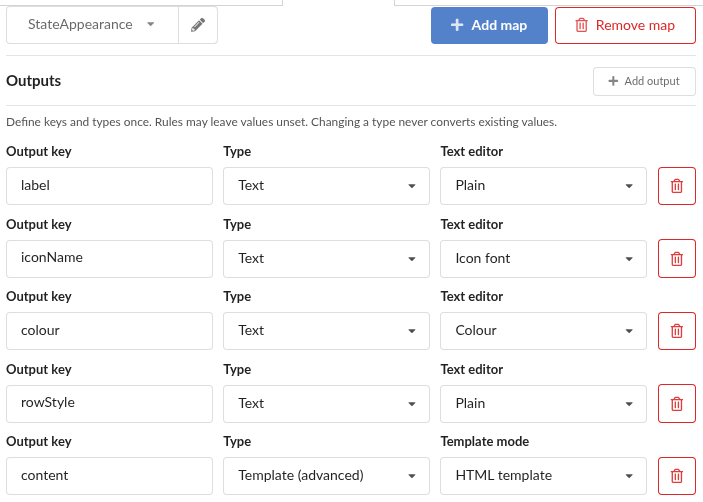
StateAppearance defines keys and types once. Icon font and Colour are Text editor aids; content uses the advanced Template choice in HTML mode.
Rule order and duplication
Drag a rule's handle to reorder it. With the handle focused, Arrow Up/Arrow Down move it within the list. Order matters whenever conditions overlap.
Duplicate rule inserts an independent copy immediately after the selected rule and selects the copy. It retains values, fragment source and asset references. Editing the copy does not edit the original. Check the duplicated condition: an unchanged copy may be unreachable because the original wins first. The fallback is not an ordinary matched rule and is not duplicated this way.
Output types
The editor offers four ordinary types and Template (advanced), whose mode is Text or HTML. The persisted schema uses six corresponding type identifiers.
| Editor type | Stored type | Stored value | Typical use |
|---|---|---|---|
| Text | text | String, including empty text | Label, colour, font-icon name, library-icon key or CSS class token. |
| Number | number | Finite Number | Severity, count, threshold or a value passed to number. |
| Boolean | boolean | true or false | A typed flag for conditions. |
| Asset reference | asset | Asset-ID string | Tracked image reference passed to asset. |
| Template, Text mode | textTemplate | Handlebars source string | Text computed from the caller's context. |
| Template, HTML mode | htmlTemplate | HTML/Handlebars source string | Authored markup rendered explicitly by renderMap. |
Objects, arrays, null and undefined are not stored output values. Absence is represented by omitting the key from a rule's values record. Use several named outputs when the consumer needs several scalar values.
Text editor aids
Plain, Icon font, Icon library and Colour are alternative editors for a Text output. They do not create additional runtime types. Icon/library pickers and the shared colour picker help author a string; the consumer still chooses icon, poolIcon, CSS or another interpretation explicitly.
Number controls store numbers rather than numeric strings. Boolean controls distinguish Unset, True and False. Asset controls use the existing asset picker/upload flow; assigning an asset closes the picker.
Changing a definition's type does not convert existing values. For example, changing a Text output containing "2" to Number leaves it invalid until you enter numeric 2 or unset it. Non-Text definitions cannot carry Text editor hints. Fix invalid rule/fallback values before saving.
Sparse values and fallback
These states are distinct:
| Rule value | Meaning |
|---|---|
| Key omitted | Unset; lookup returns undefined. |
"" | A set Text value containing no characters. |
0 | A set Number value. |
false | A set Boolean value. |
The fallback is an alternative whole result, not a set of defaults merged into each rule. If a rule matches but omits thumbnail, lookup of thumbnail is unset even if the fallback sets it. To supply a value for that rule, set it there explicitly or implement a consumer-level fallback deliberately.
Do not use a truthiness test to infer whether every kind of value is set: false and zero are real values. See the typed-value example.
Matching rules
Rules are evaluated from top to bottom; the first match determines all output values. If none matches, the optional fallback is selected. Without a match or fallback, there is no result.
Equals
Equals compares String(input) with the configured text, exactly and case-sensitively. It does not trim whitespace. Typical inputs are strings, numbers and booleans: input true matches text true, and numeric 0 matches text 0. Text Started and text started differ.
Null and undefined never match Equals, even a rule literally containing null or undefined. They use only the fallback. The strings "null" and "undefined" remain ordinary text and can match. This is string-form equality, not a typed strict-equality condition; use a Boolean/Number output to retain type in the result.
Range
Range accepts a finite numeric input or a non-empty string that converts to a finite number. Blank text, booleans, null, undefined and non-numeric values do not match. Numeric strings can include surrounding whitespace.
Both bounds are inclusive by default. Exclusive excludes that endpoint. An omitted lower/upper bound is open in that direction. A range with both bounds omitted accepts all valid numeric inputs.
| Configuration | Accepted interval |
|---|---|
| From 8, To 25 | 8 ≤ input ≤ 25 |
| From 8, To 25 exclusive | 8 ≤ input < 25 |
| To 8 exclusive, no From | input < 8 |
| From 25, no To | input ≥ 25 |
Use adjacent exclusive/inclusive endpoints to avoid an accidental shared boundary. If ranges overlap intentionally, put the higher-priority rule first. See continuous ranges.
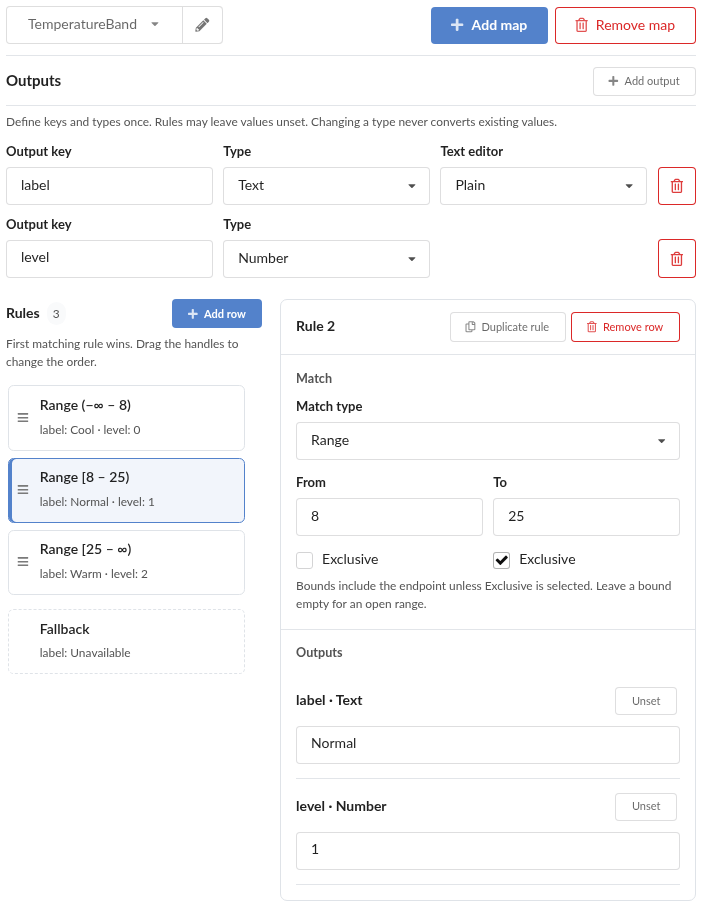
TemperatureBand with the middle rule selected: From is inclusive and To is exclusive. The overview shows all three adjacent ranges and the fallback.
Warnings versus invalid data
The editor warns about an impossible/empty range, a duplicate Equals rule and a rule fully shadowed by earlier rules. Earlier ranges may jointly cover a later range. Endpoint inclusion is considered, so a remaining point gap matters.
These are advisory matching diagnostics; intentional overlap is allowed, and partial overlap is not rejected. Invalid data such as a non-finite bound, undeclared output key or value of the wrong type must be corrected. Warnings do not change evaluation order or choose a different rule.
Test map
Test map is one collapsed section for the selected map. It tests matching independently of the rule currently open for editing. Choose an input type:
| Mode | Test input |
|---|---|
| Text | Exact text, including an empty string. |
| Number | A finite numeric value. A blank/invalid numeric input is an error, not zero. |
| Boolean | True or False. |
| No value | Undefined, covering the fallback-only behaviour shared with null/missing input. |
The result identifies the matched rule or fallback and shows each declared output's type and raw value. It distinguishes unset, false, zero and empty text. Template outputs show source, without rendering it. Click the matched-rule/fallback link to open that section in the editor. Testing and navigation do not edit the map's authored data or write runtime values.
Use this section to check precedence, numeric boundaries and missing input. It does not preview HTML or determine how an element will consume a value.
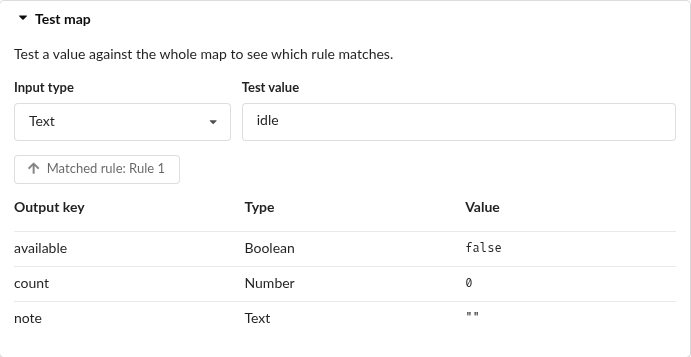
Capabilities tested with the Text input idle. The raw result table distinguishes false, 0 and empty text.
Fragment preview
The preview below a Text/HTML template output answers: What does this selected rule's fragment render with this context? It deliberately uses the rule/fallback being edited, rather than selecting another rule from the preview input.
| Control | Supplies |
|---|---|
Input value (@value) | The fragment's matched-input context variable. |
| Preview item | The item/context used as this, with its top-level value available as @root. |
| Selected rule/fallback | The raw sibling values available as @outputs. |
Changing the input may change content that reads @value; it does not switch the edited rule. Calls back into the same map in this preview also use the selected rule's values. To test which rule a real input selects, use Test map instead. A list-item preview renders through the ordinary matching path.
The preview shows rendered output, row classes and runtime diagnostics. A fragment that emits only row metadata has no visible content; inspect its reported classes. A white icon can need the preview shadow or a different actual background to be legible.
See fragment context and modes for escaping, nested calls and errors.
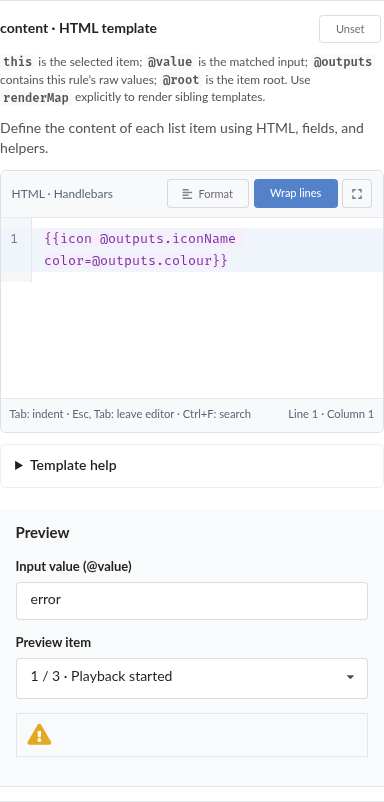
The selected error rule renders its warning icon. Input value and Preview item are separate context controls; use Test map to verify rule matching.
Usage, rename and deletion
Where used lists references within the current layout and can filter by output. Entries identify the element/property or map output and rule/fallback, with a source line where available. Current providers cover List item templates and template outputs in maps.
Literal map/output names can be resolved. Computed names/keys and unparseable templates are listed as potential usages, with an explicit unresolved status. The editor does not guess their target. This overview is scoped to the layout, not a search of every dashboard in the system.
Renaming an unambiguous map or key updates provable literal references. Output renames also move stored rule/fallback values and update the owning map's @outputs/literal lookup references. Dynamic or ambiguous references require manual review; warnings identify cases that cannot follow safely.
Before removing an output, review its consumers. Removal deletes its definition and its values in all rules/fallback. Removing a map deletes that map. Consumer source is not automatically removed; remaining calls can resolve empty or report a missing reference. Unset is narrower: it removes one rule's value while retaining the definition and consumers.
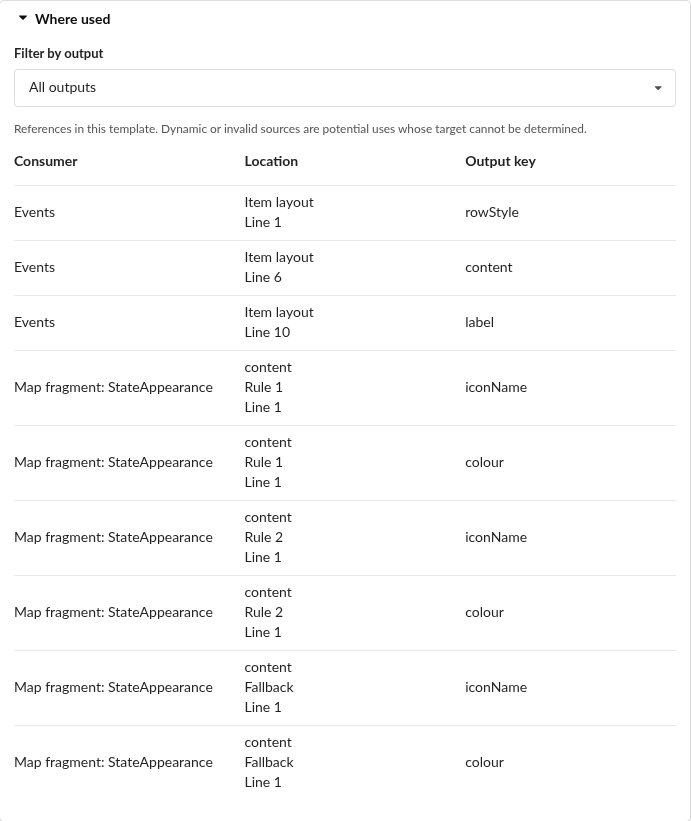
StateAppearance usages: the Events item template and each stored content fragment, including fallback, with their output keys and source lines.
Assets, export and import
An Asset reference output is a structured media reference. Every non-empty asset ID stored in any saved rule/fallback counts as in use, whether or not the rule currently matches. The server derives usage across saved control templates, dashboard templates and layouts embedded in page panels.
Inside a fragment, use {{asset @outputs.thumbnail}} for an Asset output named thumbnail. Help can select an existing Asset output or Add asset output and assign a picker/upload selection. The name thumbnail is conventional, not required.
The following do not protect an asset against deletion:
- An ID/title written only inside template source, even as a literal
assetcall. - An ID from runtime item data.
- A Text output whose string happens to equal an asset ID.
- An unsaved authoring change that has not reached the saved document.
Removing the last structured reference and saving releases the asset. Deletion of a still-used asset is rejected. A missing or deleted untracked asset renders no image.
Portability
Template/dashboard export clears structured Asset output IDs and image/draggable asset references in every contained layout. It keeps output definitions, matching rules, fragment source, ordinary text, icon/library keys, false and zero. The export operates on a clone, leaving the saved source unchanged. The private server usage index is not exported.
After import, assign destination-system assets through the picker and save. Source-only literal IDs/titles are preserved as source, so review them separately; they may not resolve on the destination. Library-icon keys are also preserved and require the corresponding destination library. Imports validate the current map shape and template syntax before accepting it into the working copy.
Troubleshooting
| Symptom | Check |
|---|---|
| A rule never wins | Earlier rules, duplicates and fully covered ranges; confirm with Test map. |
| Null does not match the text null | Choose No value and define a fallback; text null is a separate input. |
| A fallback output is missing after a match | Sparse matching rules do not inherit fallback keys. |
| Source appears literally | Use renderMap for a Template output; map deliberately returns source. |
| A fragment stays on the same rule when its input changes | That is the selected-rule fragment preview. Test map verifies selection. |
| A colour/icon output has no effect | Text editor hints are authoring aids. Call the appropriate helper/use the value in markup. |
| A row class is reported invalid | Check tokens, prefix expectations and unset values; guard sparse results. |
| A type change prevents saving | Correct/unset old values; types are not converted automatically. |
| An asset can still be deleted | Save a typed Asset reference; source-only/runtime references are untracked. |
| Rename leaves warnings | Review computed references or syntax errors manually. |
Maps store their name, output definitions, rules and optional fallback directly, without a version field.