Item templates and helpers
This reference describes the template language currently used by the List element. For general map configuration, read Value maps; for complete setups, use the worked examples.
Editing and previewing
Open Item layout to edit the HTML/Handlebars source of one list entry. Template outputs in a value map use the same editor, in Text or HTML mode.
| Action | Effect |
|---|---|
| Format | Indents valid source. Formatting is unavailable for empty or syntactically invalid source. |
| Wrap lines | Changes the editor display; it does not insert line breaks into the source. |
| Expand button | Enlarges the editor for longer templates. |
| Ctrl+F | Searches the source. |
| Tab | Indents within the editor. Press Esc, then Tab, to leave it. |
| Ctrl+Z | Undoes typing, inserted examples and formatting. |
Cancelling or switching the edited template/control resets its editor history, so undo does not restore another document's source. Previewing another entry does not change the source, field choices or real list data.
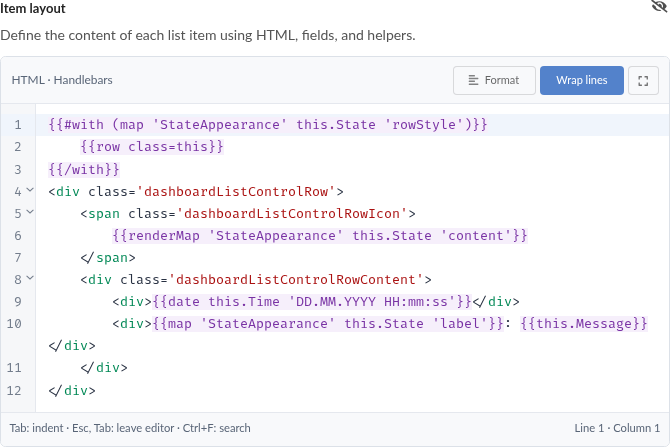
The event example in the current item editor, including the guarded row class and explicit mapped fragment.
Template help
The expandable Template help contains six groups:
| Group | Examples |
|---|---|
| Fields | Escaped field, empty-field fallback, raw HTML, whole entry, JSON and a field whose name matches a helper. |
| Formatting | Numbers and dates. |
| Conditions and loops | If/else, numeric threshold, nested list with separators/empty text and nested object with with. |
| Icons and images | Font icon, library icon and asset. |
| Value maps | Raw lookup and explicit template-fragment rendering. |
| Row layout | One configurable outer-row class example and an icon beside two text lines. |
Each example contains configuration controls, generated code and a rendered preview. Insert replaces the editor selection at the cursor; Copy copies the source. Neither action inserts preview data.
Field suggestions come from compatible values in the first list entry. Preview item changes the item used for rendering without regenerating your chosen field paths. A field suggested by the first entry may be missing in another entry; this is useful for checking fallback behaviour.
When suitable live data is unavailable, field, nested-list and nested-object examples display labelled sample data. Their code still resolves a field or executes the helper being demonstrated. For example, an escaped-field sample contains a Message field with markup; the source remains {{this.Message}}, and the markup appears as text. The raw-HTML sample deliberately renders markup. The empty-field sample contains an empty value, so the fallback branch actually runs.
Sample data is confined to that example's preview. Inserting its source does not add Message, Items or Details fields to your real items. Replace sample field paths with your actual schema before relying on them in a list.
Literal assets require a real selection through Select asset. A library-icon example without a compatible live key waits for an explicit key or a picker choice. There is no assumed installed asset or library icon. Unavailable snippets keep Copy/Insert disabled. Map input/output choices are remembered per map and checked against its current definitions and compatible output types.
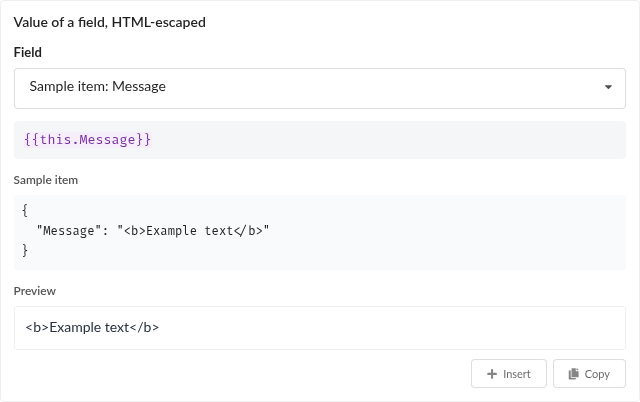
Without suitable live items, the field example resolves Message from labelled sample data. Only the displayed template source is inserted or copied.
Context and field access
| Expression | Meaning |
|---|---|
{{this}} | The current entry, or the current nested context. |
{{this.Message}} | The Message field of the current object. |
{{this.Details.Message}} | A nested field. |
{{lookup this "display name"}} | A field whose key needs quoting. |
{{@root.Message}} | Message on the original top-level entry, including inside loops/fragments. |
{{../Name}} | Name in the parent Handlebars context. |
{{@index}} / {{@key}} | Current iteration index/key inside each. |
Field names are case-sensitive. A missing field renders empty text. Helpers take precedence over fields with the same name: use {{this.icon}}, rather than {{icon}}, to read a field called icon. The same applies to asset, map, row and other helper names.
Ordinary Handlebars expressions do not evaluate arbitrary JavaScript. Use registered helpers and subexpressions such as {{number (map "Metrics" this.State "count") 0}}; the named map/output must exist.
HTML and line breaks
{{this.Message}} escapes HTML characters. With Message equal to <strong>Ready</strong>, it displays that literal text. {{{this.Message}}} inserts raw HTML and displays a bold Ready. Use raw insertion only when the value is intended to be trusted markup.
HTML written directly in the template is retained. Template rendering is not a general HTML sanitizer. The icon/image helpers validate their own arguments and generate their own markup; this does not make arbitrary triple-brace data safe.
Line breaks immediately adjacent to HTML tags are normalized to spaces, allowing indented HTML templates. Other source line breaks remain visible, as do line breaks within an inserted value. Thus two plain field expressions on separate lines produce two text lines. Handlebars whitespace control (~) can remove unwanted whitespace around expressions and blocks.
Formatting helpers
| Syntax | Behaviour |
|---|---|
{{number this.Temperature 1 locale="de-DE"}} | Formats a finite Number with exactly one fractional digit using the requested locale. Omit the digit argument for normal locale formatting. Numeric strings are not converted by this helper. |
{{date this.Time "DD.MM.YYYY HH:mm:ss"}} | Formats an ISO date string, epoch milliseconds or Date value with the same Moment format tokens as the clock element. Default: L LTS. Invalid/unsupported dates return empty text. |
{{json this}} | JSON representation, including quotes around a string. Ordinary insertion still HTML-escapes the result. Undefined returns empty text. |
Number formatting returns empty text for a non-number or non-finite number. Supply valid locale names and precision values; invalid formatting arguments can cause a rendering diagnostic. Date display uses the rendering environment's time-zone behaviour; do not assume that a UTC input is displayed in UTC unless your setup specifies that.
Conditions and loops
if, unless, each, with and lookup are standard Handlebars helpers. eq and ne use strict equality/inequality. lt, lte, gt and gte use JavaScript's relational comparisons; keep compared values consistently typed.
For this example, Temperature should be a Number. Boolean false, zero and empty text are false in an ordinary if; an absent output is also false. To distinguish false from unset, compare explicitly with eq. To include numeric zero as a present value, use includeZero=true where appropriate.
Inside each, this is a tag, not the whole item. @root still identifies the original item. For an optional nested object:
See typed outputs for false, zero, empty text and missing values in map results.
Icons and images
All three helpers produce inline markup sized by --list-icon-size, default 1.2em. Arguments can be literal values or item/mapped fields.
| Helper | Source and behaviour |
|---|---|
{{icon "play circle outline" color="green"}} | Font icon, using the same icon names as the Symbol element. |
{{poolIcon this.LibraryIcon}} | NeuroomNet library icon by key. Resolution tries the local library before the online library. Library icons retain their own colours. |
{{asset this.ImageId}} | Image from the asset library, resolved by ID or title. |
Font-icon names allow lowercase letters, digits, spaces and hyphens. Named colours are red, orange, yellow, olive, green, teal, blue, violet, purple, pink, brown, grey and black. Hex and supported rgb(...)/hsl(...) forms can also be used. Invalid names produce no icon; invalid colours are ignored. A syntactically valid name still needs a glyph in the installed font.
Unresolved library icons and assets produce no image. Asset IDs survive title changes; title references do not. If several assets have the same title, the oldest is used. Prefer a picker-selected ID for a stable reference.
The editor gives pale icons a contrast shadow in previews so they remain visible against the preview background. It preserves the configured colour. An empty-looking pale icon should be checked against the actual dashboard background too.
An asset mentioned only in source or item data is not tracked as in use. For deletion protection, store it in a declared Asset reference output; see asset lifecycle.
Raw map lookup and fragments
| Syntax | Result |
|---|---|
{{map "StateAppearance" this.State "label"}} | Raw typed value. A template output returns source, without executing it. |
{{renderMap "StateAppearance" this.State "content"}} | Renders a Text/HTML template output. Other output types are rejected with a diagnostic. |
Missing maps, keys, matches or unset values yield no visible output. A failed renderMap call also records a diagnostic. map does not add row metadata. Keys have no built-in interpretation: an output called icon is not automatically rendered as an icon, and an output called class does not style a row.
Fragment context
| Keyword | Value inside a rendered fragment |
|---|---|
this | The caller's current context. Inside an outer each, this may be a nested object. |
@root | The top-level list item. |
@value | The input passed as the second argument to this renderMap call. |
@outputs | The selected rule's raw values, including template source. |
Loop data and asset/library resolvers remain available. A nested call has its own @value/@outputs; the parent's values are restored afterwards. Use lookup for unusual keys, for example {{asset (lookup @outputs "image key")}}.
Sibling outputs are not automatically executed. {{@outputs.content}} inserts content's source as a value. To render another template output, explicitly call renderMap with its map name, input and key. See nested fragments.
Text versus HTML mode
HTML fragments keep authored markup and escape ordinary inserted data. Text fragments render to a plain string without internal HTML escaping; normal insertion into the outer HTML template then escapes that string once. A Text fragment cannot contribute row metadata, including through an HTML fragment nested inside it.
Triple-brace insertion explicitly bypasses the normal outer escaping. Use ordinary double braces for Text fragments intended as text. These modes affect rendering, not matching or the storage of source strings.
Outer-row classes
row declares metadata for the List element's outer entry without emitting visible HTML. It is independent of value maps:
The entry receives listItem-event and listItem-urgent. Tokens may contain ASCII letters, digits, underscores and hyphens; separate multiple tokens with whitespace. Empty text declares no classes. Invalid declarations contribute no classes and produce a diagnostic. Only the named class argument is supported, without positional arguments or other attributes.
Repeated declarations are combined and deduplicated per item. {{row class="selected"}} creates listItem-selected, which is different from the List element's own selected class. It does not select an item. Classes are recalculated when rendering changes, rather than accumulating on a DOM element.
HTML fragments may contribute classes to the caller. Text fragments may not. A fragment that fails after declaring a class discards its partial class contribution. Other successful declarations in the item remain.
For a sparse mapped class, guard an absent value:
Alternatively, explicitly store an empty string in rowStyle for every rule without classes. Passing an unset value directly to row is invalid. CSS must target the generated prefix. The event example uses a selector that takes precedence over default row styling while preserving the selected-row appearance.
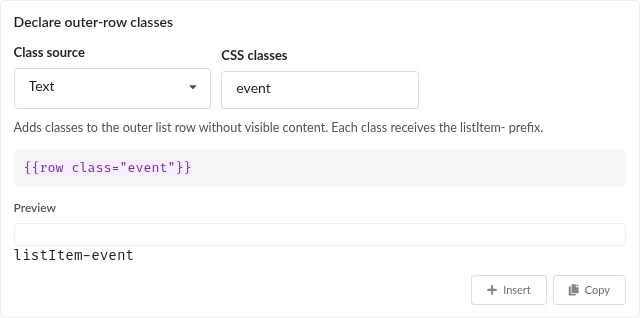
The general row helper declares listItem-event without visible row content. No map lookup is required.
Aligned content
The List stylesheet provides recipe classes for a stable icon slot beside content:
This expects Icon, Color, Time and Message fields. The content lines stay together, and the slot remains aligned even if an icon is missing. Add right to the container's class list for the opposite placement. --list-icon-size and --list-icon-gap control slot sizing and spacing. These classes arrange authored markup; maps do not automatically inject wrappers or position icons.
Diagnostics
Syntax feedback checks source structure. A syntactically valid template can still fail at runtime because of an unknown helper, invalid helper arguments or unsuitable data. Editor previews show diagnostics and contributed row classes.
| Diagnostic | Typical cause and remedy |
|---|---|
syntax | Unclosed block or malformed expression. Correct the source before saving. |
render | Unknown helper or another execution failure. Check helper names and argument types. |
missing-reference | renderMap cannot find the map, declared output, match or set value. Check names, matching and sparse values. |
type | renderMap targets an ordinary value instead of a Text/HTML template. Use map or change the definition deliberately. |
cycle | An active fragment calls itself, directly or indirectly. Break the dependency. |
depth | More than 32 active fragment calls. Reduce nesting. |
row | Invalid class declaration or metadata requested in Text mode. Correct/guard the declaration. |
A failed fragment is empty locally; surrounding item content stays visible. It does not retry with the fallback rule. Repeated sequential calls to the same fragment are allowed; cycle protection concerns active nested calls. If the outer item template itself throws, its HTML and row classes are empty.
For matching questions use Test map. For fragment context/appearance use fragment preview. Those previews answer different questions.