Control Templates - NEW
This chapter was updated for NeuroomNet 2023.3 on 01.10.2024.
Control templates are the basis for developing panels and entire controls (dashboards). On a panel, controls are copied from a library of templates and configured according to specific needs.
The purpose of this document is to explain the concept behind control templates. Building controls and panels is a separate topic.
Note upfront: All descriptions and especially all inserted images are based on the current implementation, which especially regarding styling still represents a preliminary stage. Regardless of this, the concepts and processes presented should correspond to the final implementation.
Structure of a Template
A template itself is composed of elementary building blocks (controls) provided by NeuroomNet as a toolkit. Unlike with templates, creating custom building blocks is not planned for now. The usage in turn is very similar to how templates are used to build panels: building blocks are added to a template as copies, configured, and arranged.
Such a template might look like this:
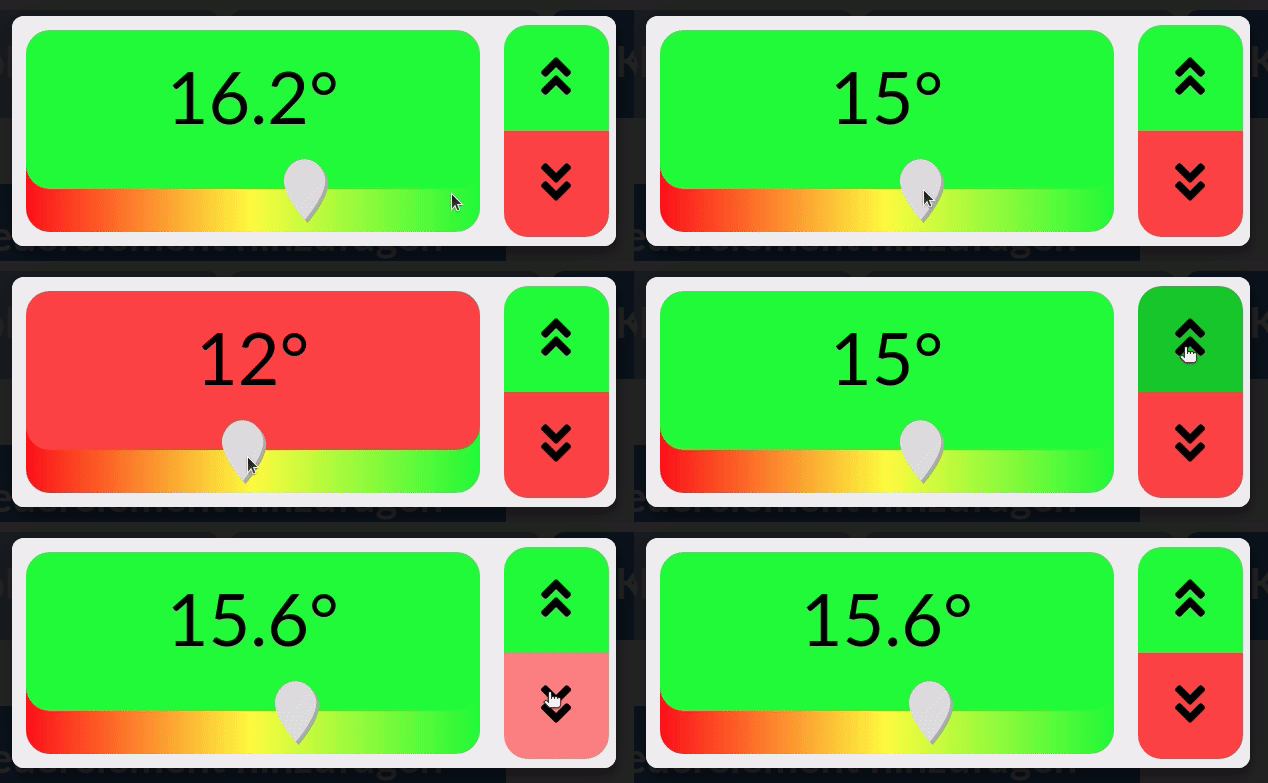
In the wide left area, a static text with the current value of a variable is displayed at the top, the slider below allows this value to be changed freely. Depending on a threshold value, the background colour of the static text changes. In the narrow right area, two switches allow for quick value changes in predefined steps.
Tutorial
In individual steps, see sub-chapters, the above example is to be built as a template. This covers almost all aspects of template development; missing or insufficiently detailed aspects will then be explained separately.